In today’s world, smartphones have become powerful tools for just about everything—even measuring sound. Decibel meter apps promise to tell you how loud your environment is, whether it’s a bustling city street, a rock concert, or a quiet home office. For many people, these apps offer an easy, convenient way to monitor noise levels and protect their hearing. But how accurate are these apps, really?
Understanding the reliability of decibel meter apps is especially important for adults concerned about long-term hearing health, caregivers monitoring loved ones, or anyone exposed to potentially loud environments. While smartphones are capable of impressive feats, they weren’t originally designed to function as precision sound measuring devices. This means that, while a decibel meter app can give you a general sense of sound levels, its readings might not always match what a professional sound level meter would report.
This article dives deep into how decibel meter apps work, what research says about their accuracy, and the factors that can affect their readings. We’ll also explore practical uses for these apps and share tips on how to get the most reliable results from your smartphone. By the end, you’ll have a clear understanding of what decibel meter apps can do—and where you might still need professional equipment to make precise measurements.
Understanding Decibels and Sound Measurement
Before evaluating the accuracy of decibel meter apps, it’s helpful to understand what decibels actually measure and why they matter. Decibels (dB) are a unit of sound intensity that describe the pressure level of a sound relative to a reference level. Because the human ear perceives sound logarithmically, a sound that is 10 dB higher is perceived as roughly twice as loud, even though the actual pressure change is much greater.
Sound measurement isn’t just about raw numbers. Professionals often use A-weighting, written as dB(A), to adjust measurements to reflect the sensitivity of human hearing. High-pitched sounds, for example, are perceived as louder than low-pitched ones at the same energy level, so A-weighted measurements give a more accurate representation of how a sound is experienced by the average listener.
Accuracy in measuring decibels matters because prolonged exposure to high sound levels can lead to hearing damage. Everyday sounds such as traffic (70–85 dB), loud music (90–110 dB), or power tools (100–120 dB) can gradually affect hearing over time. While short-term exposure to extremely loud sounds (above 120 dB, like fireworks or concerts) can cause immediate harm, repeated exposure to moderately loud environments can also be detrimental.
Professional sound level meters use calibrated microphones and precise electronics to ensure measurements are consistent and reliable. Smartphone apps, by contrast, rely on the device’s built-in microphone, which was primarily designed for voice recording, not for accurate sound level detection. This means that while apps can indicate whether an environment is generally quiet, moderate, or loud, their readings may not always align perfectly with professional instruments.
Understanding these basics is essential before relying on a decibel meter app. Knowing what dB(A) measures and why calibration matters helps users interpret app readings more intelligently and take appropriate steps to protect their hearing.
How Decibel Meter Apps Work
Decibel meter apps transform your smartphone into a basic sound-measuring tool by using the device’s built-in microphone and specialized software. While the concept sounds simple, several factors determine how these apps function and how accurate their readings can be.
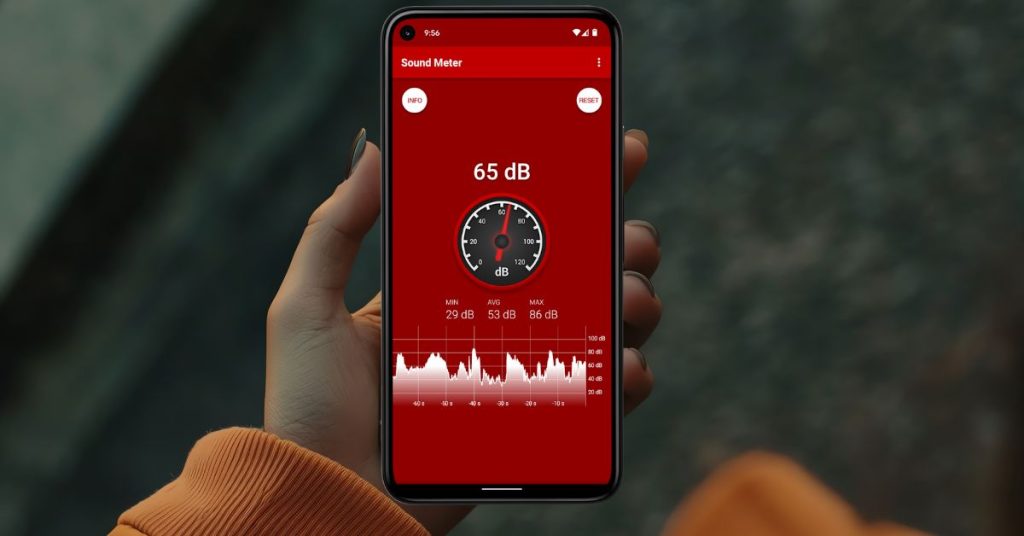
At the core, the app listens to the sound picked up by your phone’s microphone. The microphone converts the fluctuations in air pressure caused by sound waves into electrical signals. The app then analyzes these signals using algorithms to calculate a sound level, typically in decibels (dB) or A-weighted decibels (dB(A)). Some apps also display additional metrics, like peak sound levels, averages, and real-time sound graphs.
One major difference between apps lies in platform and hardware consistency. iPhones generally provide more consistent results because Apple controls both hardware and software across devices, including the microphones and audio processing. Android devices, on the other hand, vary widely in microphone quality and internal audio processing due to the numerous manufacturers, leading to inconsistent results between models.
Many apps attempt to improve accuracy by simulating professional sound meter features, such as:
A-weighting adjustments to mimic human hearing sensitivity
Peak and average measurements to capture sudden loud sounds or overall noise exposure
Calibration options that allow the user to adjust readings using a known sound reference
However, even the best apps cannot fully replicate the precision of a professional sound level meter. Smartphone microphones are not calibrated to industry standards, and factors like phone case, positioning, and background interference can influence readings. Apps can give a reliable general sense of loudness but often fall short when precision is critical, such as for workplace compliance or scientific research.
Despite these limitations, decibel meter apps remain popular because they are convenient, portable, and free or low-cost. Understanding how they work helps users interpret readings appropriately, know when to trust them, and recognize when a professional measurement is necessary.
Accuracy of Decibel Meter Apps: What Research Shows
Many people wonder whether decibel meter apps can be trusted for accurate sound measurements. Research and lab testing provide a clearer picture, revealing both their potential and their limitations.
Several studies have tested popular decibel meter apps against professional-grade sound level meters. Findings generally show that accuracy varies depending on the app, device, and environment. For instance, research conducted by the National Institute for Occupational Safety and Health (NIOSH) in the United States evaluated a handful of iOS and Android apps under controlled conditions. The study found that some iOS apps measured within ±2 dB of professional meters for A-weighted readings—a margin considered reasonably accurate for everyday purposes. Android devices, however, showed more variability due to differences in hardware and microphone quality.
Other lab tests have demonstrated that even the best apps can struggle under certain conditions. Extremely quiet or very loud environments often result in larger discrepancies, sometimes exceeding ±5 dB. Sudden, sharp noises (like clapping or hammering) can also create spikes that the app may not capture correctly. These limitations mean that while apps are useful for general awareness, they cannot replace calibrated instruments for precise measurements or regulatory compliance.
It’s also important to note that calibration can improve accuracy. Some apps allow users to calibrate their smartphone microphone against a known sound source. When done correctly, calibration can reduce error and make readings more reliable, though they still rarely achieve the precision of professional equipment.
Overall, research shows that decibel meter apps are adequate for casual use—such as monitoring household noise levels, concerts, or traffic—but they are not suitable for legal, industrial, or scientific measurements. Users should view app readings as estimates rather than exact values, using them as a guide to protect hearing rather than as definitive measurements.
Factors Affecting Accuracy
Even the most well-designed decibel meter apps can give inconsistent readings if certain factors aren’t considered. Understanding these variables helps users interpret results more accurately and make better decisions about their hearing health.
Smartphone Hardware
The built-in microphone is the most critical component affecting app accuracy. Microphones are primarily designed for capturing speech, not precise sound levels across a wide frequency range. Higher-end smartphones, particularly newer iPhones, tend to have better microphone consistency, which can improve app reliability. In contrast, many Android devices have microphones that vary significantly in quality, leading to inconsistent measurements across different models.
App Design and Calibration
Not all decibel meter apps are created equal. Apps that include A-weighting, averaging functions, and real-time monitoring tend to provide more reliable results. Calibration features also make a significant difference. By adjusting the app against a known sound source, users can reduce errors, though this still doesn’t match professional calibration standards. Apps without calibration or advanced processing can be off by 5–10 dB or more in some cases.
Environmental Factors
The surrounding environment can impact readings. Hard surfaces like walls or floors can reflect sound and create spikes, while soft surfaces like carpets and curtains can absorb it. Background noise, wind, or proximity to speakers also affect results. For example, holding a phone close to a speaker may show higher readings than standing a few feet away.
Positioning and Usage
How you hold or position your smartphone matters. Holding the phone in a pocket or behind a case can muffle the microphone, while placing it in an open hand or on a flat surface yields more consistent results. Orientation can also affect readings, especially for directional microphones.
Sound Characteristics
Certain sounds are harder for smartphone microphones to capture accurately. Low-frequency rumbles, very high-pitched tones, or sudden spikes can lead to inaccurate readings. Apps perform best with steady, mid-range sounds and may struggle with complex or dynamic soundscapes.
By keeping these factors in mind, users can improve the reliability of their app readings. Simple steps like calibrating the app, holding the phone properly, and avoiding obstructions can significantly reduce errors. While these measures won’t transform a smartphone into a professional sound level meter, they can make the readings more useful for everyday monitoring.
Practical Uses of Decibel Meter Apps
Despite their limitations, decibel meter apps can be surprisingly useful for everyday situations. They provide a convenient way to monitor sound levels in a variety of environments, helping users make informed decisions to protect their hearing and maintain comfort.
Monitoring Home and Neighborhood Noise
Many people use decibel meter apps to check noise levels at home or in their neighborhoods. For instance, you can measure how loud a lawn mower, vacuum cleaner, or air conditioner is, or monitor street noise if you live near busy traffic. This information can help homeowners and renters identify sources of excessive noise and take steps to reduce exposure, such as using soundproofing materials or rearranging living spaces.
Protecting Hearing at Work or Public Spaces
For adults in noisy work environments, such as construction, manufacturing, or even busy office settings, these apps provide a rough estimate of exposure levels. While they are not suitable for regulatory compliance, apps can alert users when sound levels are high enough to warrant hearing protection, helping prevent long-term hearing damage. Similarly, they can be used in public spaces like restaurants, gyms, or parks to gauge whether the environment is comfortably quiet or potentially harmful.
Entertainment and Events
Concertgoers, movie enthusiasts, and sports fans often find decibel meter apps helpful for monitoring sound exposure during events. By tracking decibel levels, users can decide when to use earplugs or take breaks, reducing the risk of temporary or permanent hearing loss. Even casual music listening through headphones can benefit from these apps, as they can help prevent exposure to dangerously loud levels.
Educational and Personal Awareness
Decibel meter apps also serve an educational purpose. They make users more aware of everyday sounds and the impact of prolonged exposure to loud environments. People who care for older adults or children can use apps to ensure that spaces are comfortable and safe for sensitive ears. Over time, regular monitoring can help individuals develop better habits for protecting their hearing health.
Limitations to Keep in Mind
While practical, it’s important to remember that smartphone apps are not substitutes for professional measurement tools. They are best used for general awareness, personal monitoring, or casual comparison of noise levels. For occupational safety, legal compliance, or scientific studies, calibrated sound level meters are still required.
Recommended Apps and Tips for Better Accuracy
For those interested in using decibel meter apps effectively, choosing the right app and applying a few practical tips can significantly improve the reliability of your measurements.
Recommended Apps
Some apps are widely regarded for their accuracy and user-friendly features:
NIOSH Sound Level Meter (iOS): Developed by the National Institute for Occupational Safety and Health, this app is one of the most reliable options for iPhone users. It includes A-weighting, real-time monitoring, and calibration options.
Decibel X (iOS & Android): Popular for its intuitive interface and graphical displays, Decibel X offers calibration and both dB and dB(A) readings. Accuracy may vary on Android devices due to hardware differences.
Sound Meter (Android): A straightforward app that provides basic dB readings and graphical monitoring. Its reliability improves when calibrated against a known sound source.
Too Noisy Pro (iOS & Android): Designed for monitoring environmental noise, this app is ideal for classrooms, home monitoring, or public spaces.
Tips for More Accurate Readings
Calibrate Your App: Whenever possible, calibrate the app using a known sound source. This can reduce discrepancies caused by microphone limitations.
Use an External Microphone: For higher accuracy, some apps support external calibrated microphones, which can drastically improve reliability.
Hold Your Phone Properly: Keep your phone in an open hand, away from pockets or cases that could muffle sound. Ensure the microphone isn’t obstructed.
Choose the Right Environment: Avoid measuring near reflective surfaces, vents, or fans, which can distort readings. Steady, mid-range sounds yield the most reliable results.
Compare Over Time: Take multiple measurements at different times and positions to get a better average of the actual sound level.
Conclusion
Decibel meter apps have become a popular tool for anyone wanting to monitor sound levels conveniently using a smartphone. They offer a practical way to gauge noise in homes, workplaces, public spaces, and entertainment venues, helping users make better decisions to protect their hearing. However, while they provide valuable insights, these apps are not a substitute for professional sound level meters.
Research shows that the accuracy of decibel meter apps varies depending on the device, microphone quality, app design, and environmental conditions. iOS devices generally provide more consistent results, whereas Android devices can vary widely. Calibration, proper handling, and choosing the right app can improve accuracy, but users should always treat readings as estimates rather than definitive measurements.
For everyday use—like monitoring household noise, concerts, or traffic—decibel meter apps are perfectly adequate. They raise awareness of potentially harmful sound levels and promote healthier hearing habits. For regulatory, industrial, or scientific applications, however, professional equipment remains necessary to ensure precise, legally compliant measurements.
By understanding how decibel meter apps work, what affects their accuracy, and how to use them effectively, users can take control of their sound environment, protect their hearing, and enjoy the convenience of smartphone technology.
FAQ
What is a decibel meter app, and how does it work?
A decibel meter app is a smartphone application that measures the sound level in an environment. It works by using the phone’s built-in microphone to detect sound waves, converting them into electrical signals, and then processing these signals with algorithms to display the sound level in decibels (dB) or A-weighted decibels (dB(A)). While convenient, the accuracy depends on the device, app design, and environmental factors.
Are decibel meter apps accurate enough to protect my hearing?
Decibel meter apps are generally accurate enough for everyday use, such as monitoring home, public, or entertainment noise levels. They provide estimates that can help you decide when to use hearing protection. However, they are not as precise as professional sound level meters and should not be relied upon for legal, industrial, or scientific measurements.
Do iPhone or Android apps give better results?
iPhone apps tend to be more consistent because Apple controls both hardware and software across devices, including the microphones. Android accuracy can vary widely depending on the manufacturer and microphone quality. In both cases, calibration and careful usage improve reliability.
Can I improve the accuracy of decibel meter apps?
Yes. Accuracy can be improved by calibrating the app with a known sound source, using an external calibrated microphone, holding the phone properly without obstructions, avoiding reflective or noisy surfaces, and taking multiple readings to get an average sound level.
Which decibel meter apps are recommended?
Some reliable apps include NIOSH Sound Level Meter (iOS), Decibel X (iOS & Android), Sound Meter (Android), and Too Noisy Pro (iOS & Android). Choosing an app with calibration features and good user reviews can improve the reliability of readings.
This article is for informational purposes only and is not a substitute for professional medical advice, diagnosis, or treatment. If you are concerned about your hearing or ear health, please consult a qualified healthcare provider.