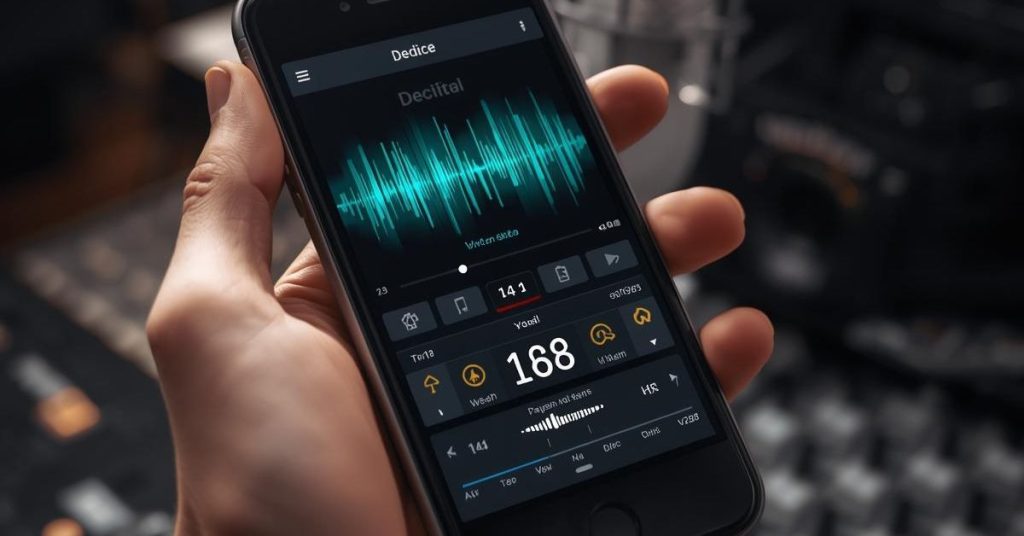
Monitoring the sounds around us has never been more important. Whether you’re worried about protecting your hearing, measuring workplace noise, or simply curious about the decibel levels in your environment, having the right tools makes all the difference. Today, smartphones offer a convenient way to track sound levels through dedicated apps that turn your device into a portable sound meter. While these apps aren’t a substitute for professional-grade equipment, they provide a reliable and accessible solution for everyday noise monitoring.
For adults over 50, caregivers, and people with hearing concerns, understanding and managing exposure to loud sounds is essential. Prolonged or repeated exposure to high decibel levels can lead to hearing loss, tinnitus, and even impact overall health. By using sound measurement apps, you can monitor environments like busy streets, concerts, or even your own home, and make informed decisions to protect your hearing.
In this article, we’ll explore the top 10 sound measurement apps available for iPhone and Android devices, outline the key features to look for, and provide tips on using them effectively. From apps developed by health organizations to user-friendly meters for casual use, there’s a solution for everyone. Let’s dive in and see which apps can help you track and manage your noise exposure with confidence.
Why Monitoring Sound Levels Matters
Sound is all around us, from the hum of traffic to the chatter in a crowded room. While most everyday noises are harmless, prolonged exposure to high decibel levels can have serious consequences for your hearing and overall health. Understanding why monitoring sound levels matters is the first step toward protecting your ears and maintaining long-term wellbeing.
One of the most common risks of exposure to loud noise is hearing loss. According to the World Health Organization, over 1.5 billion people worldwide live with some form of hearing impairment, and prolonged exposure to noise above 85 decibels (dB) can accelerate this damage. Simple activities like using power tools, attending concerts, or even listening to music through headphones at high volumes can contribute to gradual hearing decline. By tracking the sound levels around you, you can make informed decisions, such as lowering volume, using ear protection, or limiting the time spent in noisy environments.
Another common concern is tinnitus, which is often described as ringing, buzzing, or hissing in the ears. Exposure to excessive noise is one of the leading triggers for tinnitus. Regularly measuring environmental sound levels with an app allows you to identify when noise reaches unsafe levels and take preventive action before permanent damage occurs.
Monitoring sound is also crucial for workplace safety. Many jobs involve consistent exposure to machinery, traffic, or other loud environments. Employers often require monitoring to comply with safety regulations, but personal tracking can empower employees to safeguard their own hearing outside of work. Even for home environments, apps can help you assess if daily noise exposure is within safe limits, particularly in spaces like workshops, home gyms, or areas near construction.
Finally, sound measurement isn’t just about protection—it’s about awareness. Being mindful of the decibel levels around you encourages better habits, like speaking in quieter tones, reducing background noise during conversations, or protecting sensitive hearing in social situations. For adults 50+, caregivers, or anyone experiencing changes in hearing, this awareness is a practical, everyday tool to maintain auditory health.
By integrating sound monitoring into your routine, you gain a clearer picture of your environment and take proactive steps to prevent hearing damage.
Key Features to Look for in a Sound Measurement App
With so many sound measurement apps available, choosing the right one can feel overwhelming. Not all apps are created equal, and the features they offer can greatly affect how accurate and useful your readings are. Whether you’re monitoring everyday noise, workplace environments, or personal listening habits, understanding the essential features will help you select an app that meets your needs.
Accuracy and Calibration
Accuracy is the most important factor in a sound measurement app. While smartphone microphones can vary in sensitivity, some apps allow calibration against a reference sound level. Calibration ensures that the readings you see closely reflect real-world decibel levels. Professional-grade apps or those backed by health organizations often provide more precise measurements, which is especially important if you are monitoring hearing risks or occupational noise exposure.
Decibel Units and Weighting
Most apps display readings in decibels (dB), but some offer additional weighting options such as dBA and dBC. The dBA scale mimics the human ear’s sensitivity to different frequencies and is commonly used for hearing protection guidelines, while dBC measures low-frequency sounds more accurately, useful in industrial settings. Choosing an app that allows you to switch between these options gives you a better understanding of the sounds in your environment.
Real-Time Graphs and History
Many apps include visual graphs and historical data tracking. This feature is useful for observing patterns over time, such as noise levels peaking at certain hours or in specific locations. Historical tracking can also help you identify habits or environments that may be affecting your hearing health, enabling you to take preventive action.
Alerts and Notifications
Some advanced apps provide customizable alerts when sound levels exceed safe thresholds. This feature is particularly useful in workplaces, concerts, or busy public areas where prolonged exposure to loud noise can occur without your immediate awareness. Alerts act as real-time reminders to protect your hearing, such as using earplugs or moving to a quieter space.
User-Friendly Interface
Ease of use is often underestimated but is crucial, especially for older adults or people who are not tech-savvy. Look for apps with clear displays, simple controls, and straightforward instructions. Some apps also provide educational content on safe noise exposure, which can be valuable for caregivers or those new to monitoring sound.
Data Export and Sharing
For professionals or anyone tracking long-term hearing safety, the ability to export data can be a significant benefit. Many apps allow you to save readings as spreadsheets or PDF reports, making it easy to share with healthcare providers, employers, or family members.
By considering these key features—accuracy, decibel weighting, real-time graphs, alerts, user-friendliness, and data export—you can choose a sound measurement app that provides reliable, actionable insights.
Top 10 Sound Measurement Apps
With countless apps available, it’s important to focus on those that offer reliability, ease of use, and features tailored for monitoring noise effectively. Here are the top 10 sound measurement apps for iPhone and Android, along with their standout features and best use cases.
1. Decibel X (iOS & Android)
Decibel X is widely regarded as one of the most accurate and user-friendly sound measurement apps. It displays real-time sound levels in dBA and dBC, provides frequency analysis, and includes calibration options for better accuracy. Users can track historical data, export readings, and visualize noise patterns with its intuitive graphs.
Best for: Users seeking professional-level monitoring on a smartphone.
2. NIOSH Sound Level Meter (iOS)
Developed by the National Institute for Occupational Safety and Health (NIOSH), this app is designed with safety and accuracy in mind. It calculates noise dose, tracks exposure over time, and alerts users to potentially harmful noise levels. The app is backed by research, making it highly reliable for occupational and personal use.
Best for: iPhone users looking for scientifically validated noise monitoring.
3. Sound Meter – Decibel & Noise Detector (Android)
This Android-friendly app is simple yet effective, offering real-time dB readings with minimum, maximum, and average values. The visual interface makes it easy to understand noise levels at a glance, while a built-in history function helps track patterns over time.
Best for: Casual users who need a quick, easy way to check noise levels.
4. SPL Meter (Android)
SPL Meter is a straightforward decibel meter that measures sound pressure levels and displays results instantly. Some versions offer calibration and graphing features for users who want more detailed analysis.
Best for: Android users seeking a no-frills, reliable SPL reading.
5. Decibel: dB Sound Level Meter (iOS & Android)
This app provides simple decibel readings with optional frequency analysis. It’s ideal for environmental noise checks, home use, and monitoring personal listening devices. The interface is clean and accessible, making it popular among older adults.
Best for: Users who want a clear, easy-to-read interface without advanced technical features.
6. Sound Meter & SPL Tools (Android)
This app combines basic decibel measurement with additional tools, such as frequency analysis and historical graphs. It offers alerts for high noise levels and provides an easy way to track trends over time.
Best for: Android users looking for a versatile tool for everyday and occasional professional use.
7. Noiise (iOS)
Noiise focuses on providing accurate sound level readings with real-time graphs and historical data tracking. Its minimalist design makes it intuitive for users of all ages.
Best for: iPhone users who prefer simplicity combined with accurate measurement.
8. Sound Analyzer App (iOS & Android)
This app combines decibel measurement with spectrum analysis, allowing users to see not just the loudness but also the frequency composition of sounds. It’s especially useful for musicians or anyone needing more detailed sound analysis.
Best for: Users interested in both volume and frequency analysis of their environment.
9. dB Meter – Measure Sound (Android)
dB Meter is a free, user-friendly Android app that offers real-time readings and basic historical tracking. It’s lightweight and works well on older devices, making it accessible for a broad audience.
Best for: Budget-conscious users or those with older Android phones.
10. Sound Meter Pro (iOS & Android)
Sound Meter Pro offers professional-grade features, including dB weighting options, calibration, alerts, and exportable data. It’s suitable for both casual monitoring and more serious sound measurement needs.
Best for: Users seeking a comprehensive solution for both personal and professional sound monitoring.
Tips for Using Sound Measurement Apps Effectively
Position Your Phone Correctly: Hold your phone at ear level and avoid covering the microphone.
Calibrate When Possible: Use reference sound sources to improve accuracy.
Understand dB Levels: A 10 dB increase represents a tenfold increase in sound intensity.
Use Alerts and Notifications: Set thresholds to protect your hearing in real time.
Track and Compare Data Over Time: Historical tracking helps identify risky patterns.
Be Mindful of App Limitations: Smartphones are not professional-grade meters.
Incorporate Hearing Protection: Use earplugs or noise-canceling headphones in loud environments.
Integrating Sound Monitoring into Daily Life
Home Environment: Measure appliances, living spaces, and create quieter areas for comfort and safety.
Workplace: Track exposure in industrial or noisy professional settings; use data to schedule breaks and protective measures.
Social Settings: Monitor concerts, restaurants, and public areas to reduce risk of hearing damage.
On the Go: Smartphones allow mobile monitoring anytime, anywhere.
Combine with Hearing Care: Pair monitoring with regular checkups, hearing aids if needed, and volume management to protect your ears.
Conclusion
Protecting your hearing has never been more important, and modern technology makes it easier than ever to monitor the sounds around you. Sound measurement apps provide a convenient, accessible way to track decibel levels in your environment, whether at home, at work, or in social settings. While smartphones can’t fully replace professional-grade equipment, they offer valuable insights that help you make informed decisions about noise exposure and hearing protection.
By consistently tracking sound levels, calibrating apps when possible, and using protective measures, you can significantly reduce the risk of hearing loss and tinnitus. Awareness is the first step toward prevention, and these apps empower you to take control of your auditory environment. Whether you’re an adult over 50, a caregiver, or someone concerned about long-term hearing health, leveraging these tools can make everyday life safer and more comfortable for your ears.
FAQ
What is the safest decibel level for everyday environments?
For most adults, exposure to sound levels below 70 dB is considered safe for extended periods. Sounds above 85 dB, such as heavy traffic or loud music, can cause hearing damage if experienced for prolonged durations. Using a sound measurement app helps you identify when levels approach or exceed this threshold so you can take protective measures.
Are smartphone sound measurement apps accurate?
Smartphone apps provide reasonably accurate relative measurements but are not as precise as professional sound level meters. Accuracy can vary depending on the device and microphone quality. Calibration options in some apps can improve reliability, and these tools are best used for tracking trends and identifying high-noise situations rather than legal or occupational compliance measurements.
Can these apps help prevent tinnitus?
Yes. By monitoring noise levels and avoiding prolonged exposure to high decibels, you reduce one of the key triggers for tinnitus. Apps that offer alerts when sound exceeds safe thresholds are particularly useful for preventing accidental overexposure in daily life.
Which app is best for iPhone users concerned about hearing safety?
The NIOSH Sound Level Meter is widely recommended for iPhone users. Developed by a reputable health organization, it provides reliable measurements, calculates noise dose over time, and offers alerts for potentially harmful noise levels.
How often should I monitor noise levels with these apps?
It depends on your environment and lifestyle. For daily exposure, checking noise in your home, workplace, or public spaces periodically can help you maintain awareness. In louder environments like concerts or construction sites, continuous monitoring with alert features is advisable to prevent accidental overexposure.
This article is for informational purposes only and is not a substitute for professional medical advice, diagnosis, or treatment. If you are concerned about your hearing or ear health, please consult a qualified healthcare provider.